How do I submit a purchase order?Updated 9 months ago
Purchase orders can now be submitted directly through our website! Simply add all your items to your cart, choose a future ship date (if applicable), and head to check out!
As an approved school customer, you can enter your authorized purchase order number directly under “Payment”:
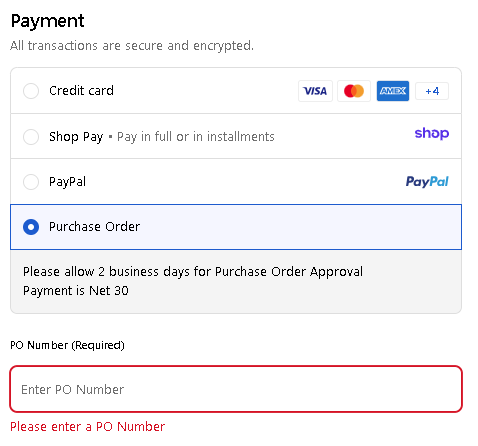
If you are logged into your Insect Lore account and do not see the “Purchase Order” option, please email us at [email protected] so we can adjust your account settings.
By entering your purchase order on our website, you are:
- Eliminating manual processing wait times
- Able to see your orders under your account history online
- Going to receive tracking for your order automatically
- Billed on Net-30 Terms
- Able to pay for your order directly on your account if using credit card (or by check via mail!)
- A new member of our rewards program allowing you to accrue points for future purchases!
This means you’ll know your order status every step of the way!
Please Note: If your purchase order is submitted through our website, we do not need to receive a physical copy of the purchase order. We are not responsible for duplicated submissions made by your organization. Charges incurred by your organization due to a duplicated submission will be payable in full.